Outdoor metal structures require a unique blend of aesthetics, durability, and functionality. From garden gates to public art installations, these structures must withstand environmental stresses while maintaining their integrity and design appeal. Drawing Exchange Format (DXF) files play a critical role in bringing these creations to life, enabling precise cutting and ensuring long-lasting results. This article explores the key considerations and best practices for designing DXF files tailored for durable outdoor metal structures.
Key challenges in outdoor metal design

Outdoor metal design presents unique challenges that affect the creation and preparation of DXF files. Here are the main factors to consider:
1. Environmental stress
- Weather exposure: Rain, wind, UV rays and temperature fluctuations can degrade metal over time.
- Corrosion: Moisture and pollution increase the risk of rust and material degradation.
2. Structural Stability
- Outdoor structures must be designed to withstand external forces such as wind pressure or accidental impact.
3. Aesthetic Longevity
- Designs should retain their visual appeal despite exposure to harsh conditions.
Implications for DXF Design:
- The file must account for material thickness, reinforcement requirements, and accurate scaling to produce robust designs.
Choosing the Right Metal for Exterior Projects

Material selection is critical when designing DXF files for outdoor metal structures. Each metal has unique properties that affect its durability and suitability for outdoor use.
1. Stainless Steel
- Benefits: Highly resistant to rust and corrosion, low maintenance and strong.
- Applications: Ideal for sculptures, gates and public installations.
2. Aluminum
- Advantages: Lightweight, corrosion resistant and easy to cut.
- Applications: Used in decorative panels and lightweight structural elements.
3. Corten Steel (Weathering Steel)
- Advantages: Develops a protective rust film, eliminating the need for painting.
- Applications: Widely used in modern architecture and outdoor art.
4. Galvanized Steel
- Advantages: Coated with a layer of zinc to prevent rust.
- Applications: Perfect for fences, gates and structural framing.
DXF file support:
- Different materials require different design approaches, such as line weights and kerf allowances, to ensure that cuts are accurate and optimized.
Best Practices for Designing Durable Exterior Metal Structures
When creating DXF files for outdoor projects, following best practices will ensure the longevity and practicality of the design.
1. Consider Material Thickness
- Select the appropriate material thickness based on the purpose of the structure. For example:
- Thin Sheets: Suitable for decorative panels.
- Thick Plates: Required for load-bearing structures or high-impact areas.
- Adjust DXF file dimensions to account for material thickness.
2. Include reinforcements
- Design features such as struts, ribs, or thicker edges into the DXF file for added structural strength.
- Use layering in DXF designs to distinguish between cutting and bending areas.
3. Simplify Complex Designs
- Avoid overly complicated patterns that can compromise structural integrity or are difficult to cut accurately.
- Use knot reduction tools to streamline curves and reduce machine processing time.
4. Incorporate Drainage and Ventilation Features
- Add holes or slots to the DXF design to allow water to drain and air to circulate, preventing rust and moisture buildup.
5. Design for assembly
- Break larger designs into modular sections that can be assembled in the field.
- Use precise fitting techniques, such as tab and slot designs, to ensure stability during installation.
Weatherproofing through design

Weather resistance is a critical aspect of exterior metal structures. Here are strategies for incorporating weather resistance into your DXF files:
1. Protective Coatings
- Plan for post-cut treatments such as powder coating, galvanizing or painting.
- Add design allowances in the DXF file for coating thickness to ensure accurate post-treatment fit.
2. Avoid sharp corners
- Replace sharp corners with rounded edges in the DXF design to reduce stress points and prevent cracking over time.
3. Use overlapping joints
- Design overlapping or interlocking joints to protect against water infiltration.
- Include additional material in the DXF file to accommodate welds or fasteners.
4. Plan for UV protection
- Incorporate shading or protective elements into the design to minimize UV exposure.
Optimizing DXF Files for Exterior Metal Fabrication
An optimized DXF file streamlines the fabrication process and ensures precision. Here's how to prepare your DXF file for outdoor projects:
1. Simplify the file
- Use CAD software to remove unnecessary lines, layers, and knots.
- Make sure all paths are closed to avoid cutting errors.
2. Manage Line Weight
- Set line weights to zero or minimum values to accurately guide cutting paths.
3. Use layering for clarity
- Separate cutting, engraving, and marking lines into different layers for easier editing.
4. Include assembly guides
- Add notches, markers, or alignment holes to the DXF file to facilitate field assembly.
5. Test the file
- Run a simulation in CAM software to identify potential cutting problems before production.
Examples of durable outdoor metal designs

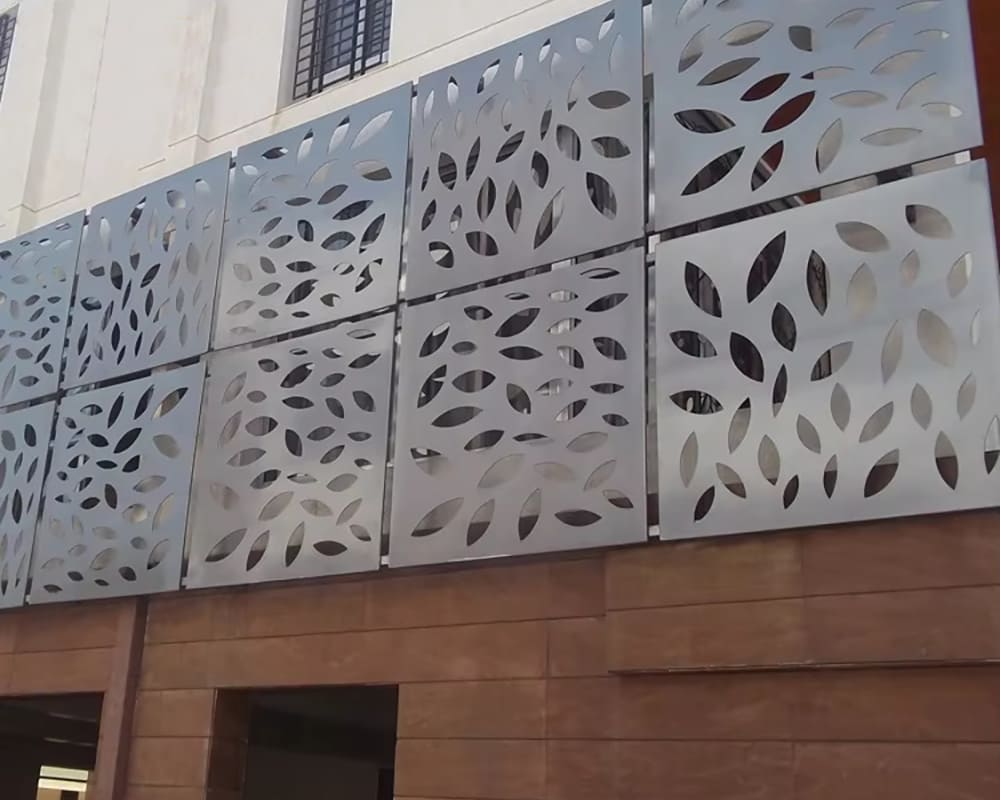
1. Decorative Panels
- Laser-cut panels with intricate patterns used for fencing or shading.
- Example: Aluminum panels designed to resist corrosion while providing aesthetic appeal.
2. Structural Frameworks
- Reinforced steel structures for pergolas or gazebos.
- Example: Corten steel frames that age gracefully with their rusty patina.
3. Sculptures
- Public art installations in stainless or weathered steel.
- Example: Stainless steel sculptures designed with modular pieces for easier transportation and installation.
4. Gates and railings
- Functional and decorative gates designed with interlocking joints.
- Example: Galvanized steel gates with powder coated finish for weather resistance.
Common mistakes to avoid
Avoid these pitfalls when designing DXF files for exterior metal structures:
1. Over-Complicating Designs
- Excessive detail can weaken the structure and increase cutting time.
2. Ignoring Material Properties
- Using the wrong material for the environment can lead to premature degradation.
3. Skipping Weatherproofing Features
- Designs without drainage or protective features can fail in harsh conditions.
4. Lack of testing
- Failure to test the DXF file can result in cutting errors or assembly problems.
Conclusion
Designing DXF files for durable outdoor metal structures requires careful consideration of material properties, environmental challenges, and fabrication techniques. By addressing these factors and following best practices, you can create designs that are not only visually striking, but also capable of withstanding the test of time.
From material selection to file optimization, each step plays a critical role in the success of your project. Whether you're creating decorative panels, sculptures or structural framing, a well-prepared DXF file is the foundation for durability and precision. Take the time to refine your designs and embrace the creative possibilities of exterior metal fabrication.